

ESO Armory System
Welcome to my Armory System Guide for ESO! The Armory System is an amazing quality of life feature, that allows players to save and switch fast between their favorite ESO Builds! The system can save your skills setup, Champion Points, Attribute Points, Mundus, Outfit and even switch on or off curses, like Vampire or Werewolf! Every player can access the system by simply acquiring an Armory Station from the in-game Crown Store for Free! The system however has a few limitations, since you can only access it through the Station or the special assistant NPC!
Table of Contents
- How to use the Armory System in ESO
- Armory Slots
- Armory Assistant
- Switch between Vampire and Werewolf
How do you use the Armory System in ESO
The Armory Station is the heart of the entire system! A Furniture that makes it possible to save and equip your Builds! To begin accessing the system, acquire the Station from the Crown Store for Free! You can then place it to your House. To start using the Station, equip first your character and create your build. When you interact with the Station you have three options available to you:
- Equip Build
- Save Build
- Build Settings
Save your Build to the first Build Slot with the Save Build option and you will be able to check it out on the Build window on the right part of the screen! The station will save your Champion Points, Attribute Points, Item Sets, Skills Points, Mundus, Curse if active, Poisons and any outfit you might be wearing.
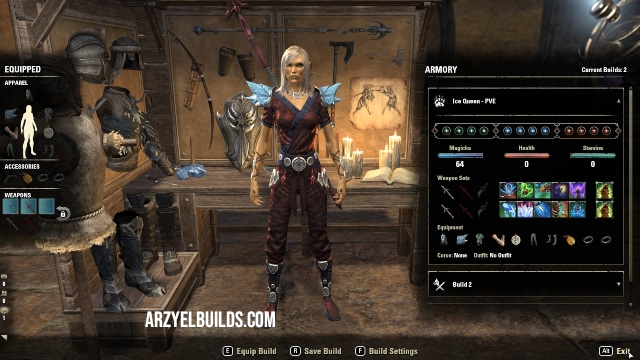
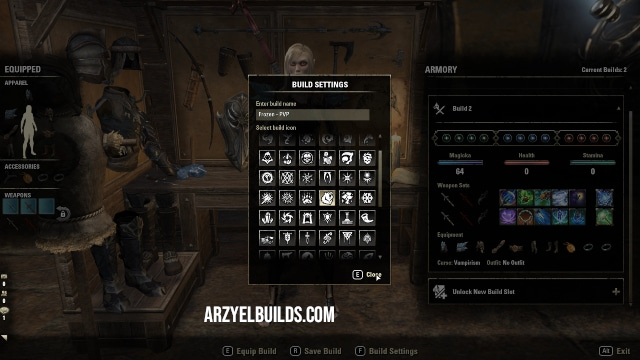
You can go ahead and change the name of the Build but also add a symbol to it, through the Build settings. This will help you recognize builds and their purpose faster. Now you can create a second Build with a different purpose than the first. Save the second build and switch to the first one if you wish by picking the first Build and pressing the Equip Build option. The Armory Station makes it easy to switch between PVE Builds and PVP Builds or even between different PVE roles, DPS, Healer or Tank.
Armory Station in PVP zones
You can take advantage of the system in PVP zones(Cyrodiil, Imperial City) by using the available Armory Stations in Portal Keeps for Cyrodiil and Sewer Entries for the Imperial City! Every alliance has access to the stations, which makes it easy to switch between different Builds!
How to Get Armory System Slots in ESO?
The Station comes with only two Build slots available. But you can increase the number of Build Slots up to ten, by simply purchasing additional from the Crown Store. Build Slots are not account wide though. You will have to unlock additional Slots for each one of your characters separately if you wish to use the Armory Station with them.
How to Get and Use the Armory Assistant in ESO
It is possible to access the Armory system even when you are not in your Home! You can do this by summoning the Armory Assistant Ghrasharog everywhere, except PVP and Trial areas. You can purchase the Armory Assistant from the Crown Store! Once you have purchased him, go to Collections, Allies Tab. Double click on him to summon him. Talk to him to save your Build or equip an already saved Build!
Can you Switch between Vampire and Werewolf with the Armory System in ESO
Yes, you can and this is actually one of its best features! You can save a Build with a curse, Vampire or Werewolf active, then cure the curse! Save the new Build without the curse on a different slot and now you can swap between the two, switching on or off the Curse(Vampire or Werewolf)!

Arzyel is a passionate Gamer and huge fan of the Elder Scrolls Series! A professional Content Creator and owner of the arzyelbuilds.com website that is focusing on The Elder Scrolls Online with the Best ESO Builds and Guides, as well as Soulframe and Throne and Liberty content with several Builds and Guides! Arzyel also publishes videos on his YouTube channel and streams on Twitch!
Thanks to his experience in Gaming and especially Online Gaming, Arzyel can create practical and effective Builds & Guides for ESO, Soulframe, Throne and Liberty and other titles, that are perfect for both New and Veteran Players! For more info you can check his Linktree and his About Me page.